
Why has our walks programme display changed?
Following a recent update to our website, we discovered that a number of purpose built functions had stopped working.
After careful consideration, we decided that the best way forward was to display our walks directly from Ramblers Walks Manager, where we were already entering the walk details. This avoids maintaining a separate walks programme on our website and reduces the risk of similar problems arising following future website updates.
What does this mean for walkers?
The new programme displays walk information directly from the Ramblers system, providing a more sustainable way to keep our programmes up to date. It also gives us a consistent format across all six of our walking groups, making it easier to find and view walks.
Although the appearance and some features have changed, you can still browse the programme to find walks that interest you and check the details before deciding which to join.
Why is my name is not shown against the walks I am leading?
The new walks programme on the Lower Wharfedale Ramblers website displays walk information directly from the Ramblers Walks Manager system. To have your name displayed against the walks you are leading, you need to give permission in your Ramblers account.
How to give permission
- Log in to your Ramblers account and scroll down to the Walks Manager tile, then click on it. You may need to log in again at this point.
- On the Walks Manager home page, click the head and shoulders icon in the top right.
- Select Contact Preferences.
- Scroll down to Permission.
- Tick “I give permission for my display name to be displayed on walks and events.” Then Save.
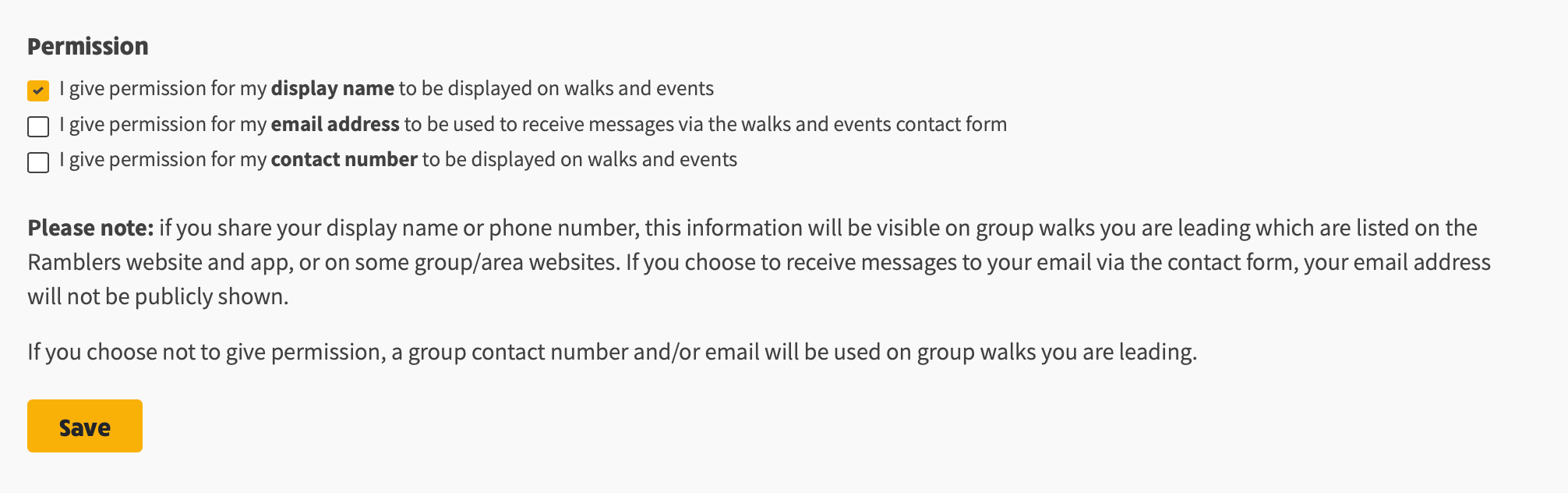
Your display name will then appear in the programme in the same shortened format used in the old walks programme. For example, John Smith will appear as John S.
Please give permission for your name only. Some members have also allowed their email address and/or phone number to be displayed. If you have done this, please review your Contact Preferences and remove those permissions, leaving name-only permission in place.
We want enquiries and other communications to go through the relevant Group Walk Coordinator, rather than individual walk leaders. This helps ensure that enquiries are handled consistently and that walkers receive accurate, up-to-date information.
The permission to display your name applies to walks and events only; it does not give permission for your details to be used for other purposes.
How do I view walk details and find the walk start?
Each of our six walking groups has a customised programme, designed to show enough information in the collapsed view to help you decide whether a walk is of interest.
To see the full details, click the “+” symbol to expand the walk entry. This reveals all the available information, including directions to the walk start using Google Maps or What3Words.
The Map Info link, to the right of Google Maps, provides the longitude and latitude coordinates for the walk start, along with the relevant Ordnance Survey (OS) map for the area.